A botched 3D print hurts more the later I find it. The bird feeder I wanted to print sliced at 18 hours and 176 g of PLA, and a failure in the first hour that I only see in the evening means a ball of spaghetti on the bed and a day lost.
My printer is an Ender-3 V2 I bought in 2020, driven by OctoPrint on a Raspberry Pi with a webcam next to the bed. The new printers come with a camera and failure detection built in, mine has none of that. I wanted that too, but local only and with no subscription to pay.
I tried OctoEverywhere first. After I installed the plugin and signed up I found out that the auto pause on AI detection is a paid perk, the free account only notifies me. I removed it the same day.
Then I tried two local models on the same photos of failed prints, taken from a distance like my webcam sees the bed. PrintGuard alerted on 1 of 8 obvious failures, and that one was a close-up. The open-source model of Obico caught all 8, plus 3 of 12 subtle early failures, and scored 0 on my empty bed. I should say most of the photos are Obico’s own, so the model has probably seen them in training.
I built the detector around the Obico model:
- Obico’s ML API runs as a local add-on on my Home Assistant box (a Raspberry Pi 5). It publishes no ports, HA calls it on the internal network and nothing leaves the LAN.
- Every 10 seconds while printing, HA has it score a webcam snapshot. That takes 0.7 to 1.2 s of CPU per frame. No Coral here, Frigate has it and the model is not compiled for it anyway.
- A warning is a push to my phone with Pause now and Ignore this print buttons. HA pauses the print on its own only when the pause level holds for 5 minutes and the score is still rising.
Then I started the bird feeder. Ten minutes in, the detector paused it. I looked at the webcam, decided the tree supports had fooled it, resumed and lowered the sensitivity. A few minutes later I cancelled the print myself, it was a mess. The first layers were torn and curled, with strands dragged across them. The detector was right and I was not. The likely cause was my slicer profile. It ran the PLA at 215 °C, while 230 °C is what works for my filament.
The reprint at 230 °C had the opposite problem. The tree supports on the first layers did push the score up, and the original rule (Obico’s, pause at once) would have stopped the print for the supports alone. That is where the 5 minute and still rising conditions came from. I replayed the logged scores against the new rule: no pause on the supports, and a simulated failure that grows over 10 minutes still gets paused after about 7.
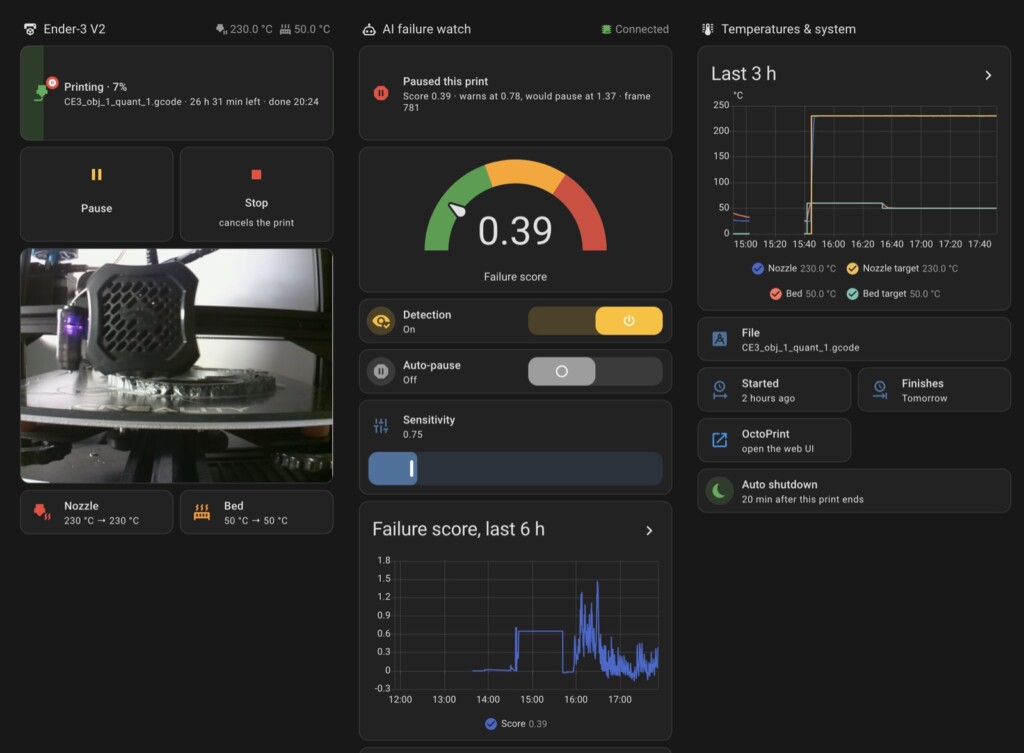
The reprint finished fine, and with the new rule in place there were no more alerts. The add-on, the Home Assistant package and the dashboard are on GitHub if you want to run the same on your printer.