We got a Roborock S7 a few years ago, I added it to Home Assistant in the spring of 2023 and never blogged about the setup. It sits on the auto-empty dock, so it can run for about a week before someone has to empty the bag in the dock. In HA I wanted the same screen as in the Xiaomi Home app (the map with the robot on it and a few buttons under it), without opening the app.
The robot is paired in Xiaomi Home, so control goes through the Xiaomi Miio integration that comes with HA. It talks to the S7 over the LAN, but it has no map. The S7 uploads its map to the Xiaomi cloud, and the Xiaomi Cloud Map Extractor by Piotr Machowski downloads it from there. His Xiaomi Vacuum Map Card draws it with the robot position and the zone cleaning, start, locate and fan speed buttons. Pretty close to the app.
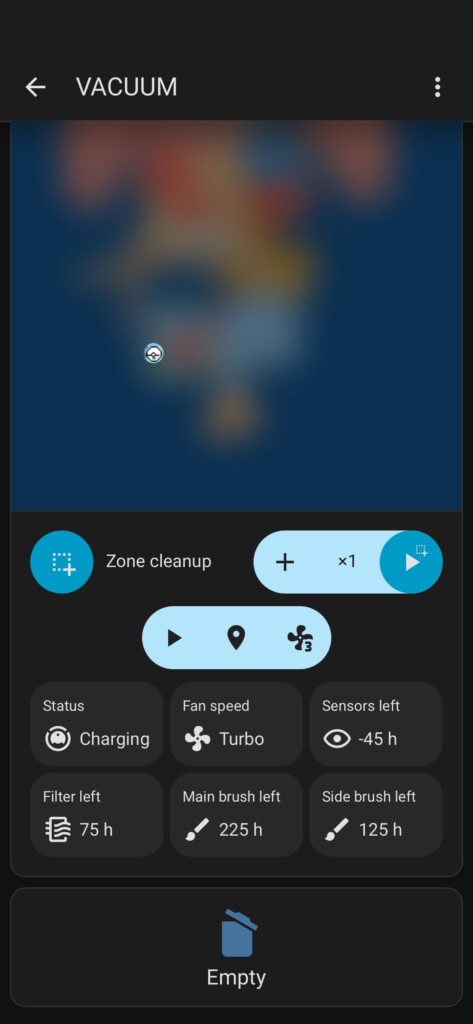
The one thing missing was emptying. The app has an Empty button that makes the dock pull the dust out of the robot’s bin, HA has nothing like it. I need it for two reasons. Do Not Disturb on the robot is set from 22:00 to 09:30, and the dock does not empty it after a run in that window. And the auto-empty does not always get the bin clean, sometimes it needs another go. Over miio the robot accepts the command fine, a script sends it with vacuum.send_command and one button under the map runs the script:
vacuum_toggle_dust_bin:
  alias: Vacuum empty dust bin (toggle)
  sequence:
    - action: vacuum.send_command
      target:
        entity_id: vacuum.roborock_s7
      data:
        command: >-
          {{ 'app_stop_collect_dust'
             if is_state_attr('vacuum.roborock_s7', 'status', 'Emptying the bin')
             else 'app_start_collect_dust' }}
There is also an evening schedule now, with a switch on the same view. Between 22:00 and midnight, once the first floor has been quiet for 45 minutes after someone was moving there, the robot starts. If nobody moved there all evening (we are away), it does not run. These runs fall in the Do Not Disturb window, so the dock does not empty after them, the Empty button covers that.
The map gave me more trouble than the buttons. In August Xiaomi started asking for a CAPTCHA on the cloud login, and I had to move the extractor to its v3 alpha, which can log in with a QR code from the app. Still, every few weeks the map went blank and I had to scan the QR code again.
In October it was blank again. I had Claude Code go through the extractor code. It stores the session token with an expiry taken from the login cookie (30 days), and a day before that date it logs in again with the password. That login now gets a CAPTCHA, and a background update cannot solve one. The token itself was fine, a request with it went through 27 days after the stored expiry. I patched the check to keep using the token until Xiaomi rejects it, and the map came back without a new login. A HACS update will overwrite the patch, so I posted the finding in the project’s issue tracker.